
A few years ago, we revamped ftrack’s scheduling tools. We’ve been listening to your feedback ever since and have gradually refined the options available. The latest addition is the filter timeline views feature, which arrived in ftrack Studio 4.2. Let’s take a look!

Creative projects are complex, with lots of departments working on many different tasks. Using filters, you can strip away some of the noise. The feature allows you to filter the schedule to focus on the information or data that is most pertinent to you at the time.

It’s a convenient tool that can improve your workflow and project insight. We thought we’d take a closer look and show you how you can filter down to specific information in the team planner. Let’s get going!

Using filters

There are many examples of how you can use this feature. For this example, we’ll look at a scenario where you specifically want to view the current workload of your compositors.

First, let’s navigate to Overview. Switch to Projects and select the timeline view: this will display your full production schedule. In this example, all of our projects are visible, with the overview schedule and important milestones already loaded in.

Let’s narrow down to the activities in the Compositing department. To do this, open the Filters panel. Add a filter for “Timeline” and filter the calendar to show “Compositing” events only.
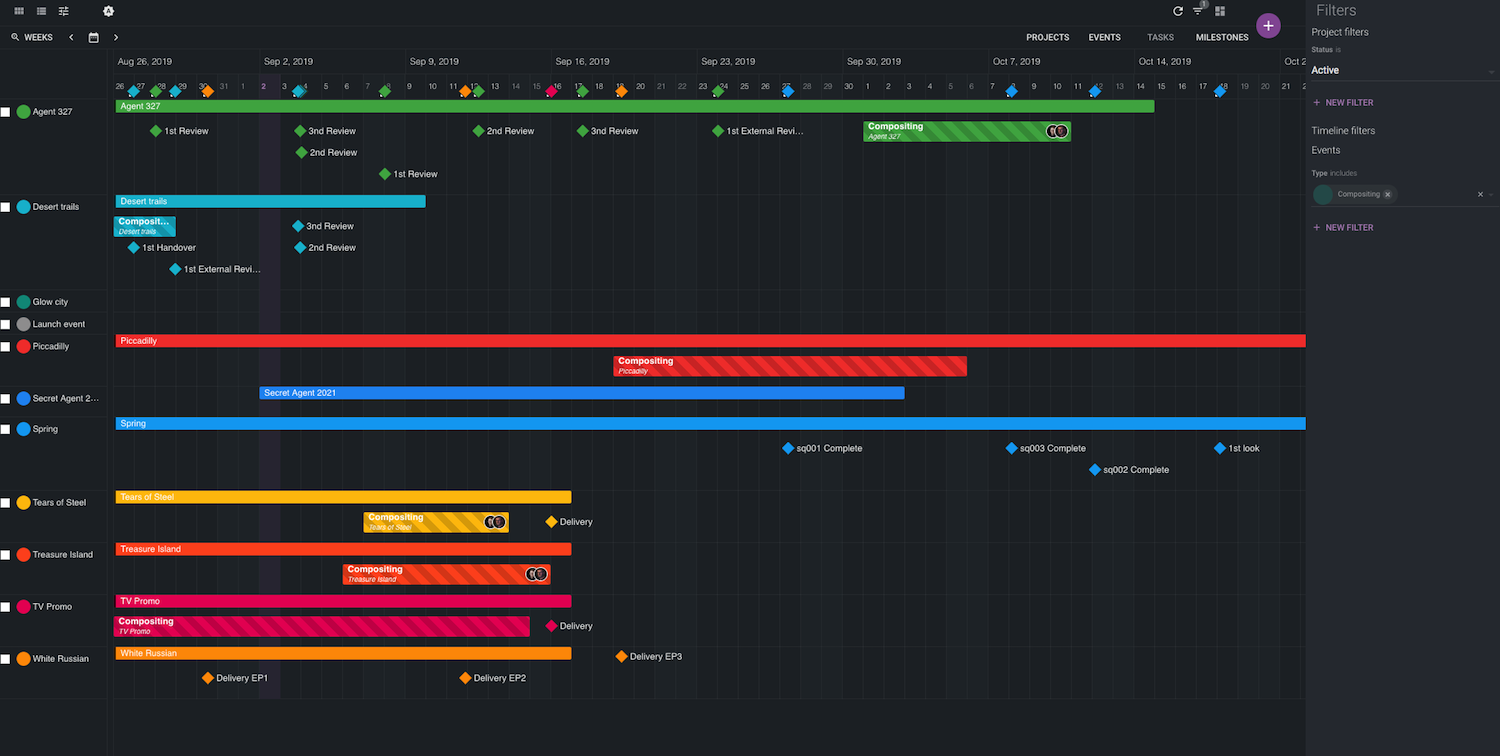
Great! Now we only see events for the Compositing department. But what about each of the compositors as individuals? What are they up to?

Let’s switch over to the Projects and Users view. This view enables you to see both the project schedule and the activities of your specific artists in one view.

You can now also filter the Users view based on the Compositing group.

You now have a view setup focused on your compositing department, which also shows the compositors group with their vacations and availability visible.

Working with filters in this way helps to navigate complex projects and make resource-based decisions with greater oversight on capacity.

Want to know more? Don’t hesitate to let us know if you have any questions about filtering in ftrack’s scheduling view. We’d be happy to chat with you about it!

Try ftrack Studio for free and plan your next project with precision. No credit card required!

Try a free 7-day trial of ftrack Studio

More from the blog

Introducing Ftrack Studio’s new top-level navigation: A smoother, smarter way to work

| Integrations, New features, News, Product, Release, Studio | No Comments
We’re thrilled to announce a major update coming to Ftrack in September 2025 — a redesigned UI navigation experience that makes it easier than ever to move through your projects,…

New integrations with Side FX Houdini, Adobe Premiere Pro, and Toon Boom Harmony

| Integrations, New features, News, Product, Release, Studio | No Comments
We’re excited to announce new ftrack Studio integrations with SideFX Houdini and Adobe Premiere Pro, along with a pre-release version of Toon Boom Harmony. Recently, we launched the new ftrack…

The new webhooks UI, external URL linking, and more

| Developer, New features, Product, Release, Studio | No Comments
The latest batch of features has arrived in ftrack Studio! Read on to learn about our new webhooks UI to automate your workflows, a new custom attribute titles URL, the…

What’s new in ftrack – Enhanced Project dashboards and streamlined data export

| New features, Product, Release, Studio | No Comments
In this update, we've made some small tweaks that make a big impact. We've introduced more flexibility in project dashboard customization and simplified the data export process—all designed to make…

New Available Tasks workflows to empower your team to self-serve tasks

| New features, Product, Release, Studio | No Comments
We’ve made ftrack’s Available Tasks workflows more easily accessible to all ftrack users! With this update, you can make your workflow more dynamic and make it easier for creatives to…

Introducing the ftrack Connect Framework and new integrations

| Announcements, Developer, Integrations, New features, News, Product, Release, Studio | No Comments
We’re excited to announce the release of our new ftrack Connect Framework, designed for pipeline support in the creative industry. This significant upgrade brings forth a suite of enhancements tailored…

Introducing the new ftrack Developer Hub

| Announcements, API, Developer, Integrations, Productivity, Studio, Tips & tricks | No Comments
We're thrilled to announce the launch of the new ftrack Developer Hub—a comprehensive resource designed for developers, pipeline technical directors (TDs), and anyone keen on maximizing their use of ftrack…

Introducing the Create Project UI: Discover a new user-friendly UI to set up your ftrack projects

| Announcements, New features, Product, Release, Studio | No Comments
We’re excited to unveil something we hope will make your project kick-offs that little bit simpler – the new Create Project UI. We've designed the new interface to make every…