

We’re thrilled to announce a major update coming to Ftrack in September 2025 — a redesigned UI navigation experience that makes it easier than ever to move through your projects, tasks, and reports with clarity and speed.
This update is more than just a facelift. It’s a thoughtful rethinking of how you interact with Ftrack Studio, designed to simplify your workflow, reduce friction, and help you focus on what matters most: creating great work. Some of you have already been enjoying the beta version – now everyone else gets to use it too!
Let’s explore the integrations in more detail.
What’s new?
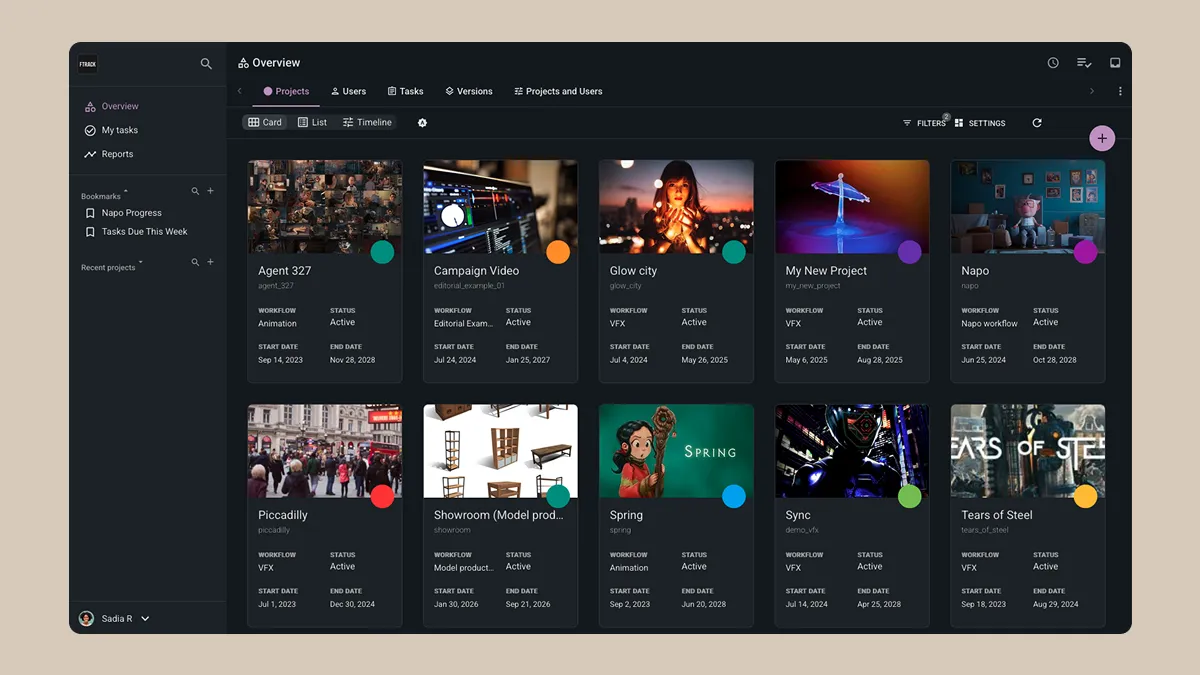
Here’s a quick look at the key changes:
- Left-side navigation bar: The top-level navigation has been relocated to the left side of the UI for a more intuitive and consistent experience.
- Improved sub-menus: Navigate between sections of the Project page with ease, thanks to new sub-level menus that surface key features without extra clicks.
- Pin custom dashboards: Dashboards can now be pinned so they always appear in the main view. You can re-order these Dashboards just by dragging.
- Streamlined account access: Your account settings, help guides, and other sub-menus are now grouped at the bottom of the sidebar for quick access.
Why this matters

This update is all about simplifying the user experience. Whether you’re a seasoned ftrack user or just getting started, the new navigation helps you:
- Find recent projects and dashboards easily: Access your most-used projects and pinned dashboards right from the sidebar, so you can pick up where you left off without searching.
- Navigate between features without losing context: Move smoothly between pages and sub-menus in a cleaner, more intuitive design that keeps key tools within reach.
- Manage teams more efficiently: Jump into project overviews, task lists, and team dashboards in fewer clicks, making it easier to monitor progress and rebalance workloads.
- Make it easier for you to work, manage teams, and find what you need — fast: A simplified layout puts everything you need in one consistent place, cutting down on distractions and helping you stay focused.
The update will begin rolling out in September 2025. We’ll be listening closely to your feedback. After all, this is just the beginning of a broader effort to make ftrack Studio more user-friendly, powerful, and enjoyable to use, and your direct input is key to making that happen in a way that benefits you as a user.
All feedback is useful for improving the new UI experience, so please feel free to add your feedback here or via [email protected] at any time.
Want to opt out?
We also know that change can be disruptive, and we want to ensure the upgrade is as smooth as possible. So if you have any concerns about the update, or if you find any part of your workflow that is not improved, you are welcome to opt out for the time being.
Details of all the changes — including the option to opt out of the new UI — can be found here.
Stay tuned for more updates, and get ready to explore your projects with a whole new perspective!
 Contact us